Blinkit seller: what it takes — and what actually decides your sales.
Most guides stop the moment you're approved. That's the easy half. Getting listed is an admin problem with a known checklist; selling is a shelf problem that plays out separately in every dark store.
Looking for a job at a Blinkit store, or a delivery partner or franchise opportunity? This page isn't that — it's for businesses selling their products through Blinkit. Blinkit's own careers and partner pages are the right place for those.
What a “Blinkit seller” actually is
A Blinkit seller is a business that supplies products into Blinkit's dark stores, which Blinkit then sells and delivers to shoppers. It is not a marketplace listing in the Amazon sense, where you hold your own stock and ship each order. Blinkit buys or holds inventory in its local warehouses and fulfils from there.
That difference matters more than any other fact on this page. Because Blinkit controls which store carries which products, you do not decide where your stock sits. You supply against purchase orders; the platform allocates. It's the single thing that most surprises brands arriving from marketplace selling.
Who can register, and what it takes
The requirements below are the ones onboarding specialists consistently publish. They line up across independent sources, but terms change and are negotiated per brand — treat this as orientation and confirm the specifics with Blinkit's seller portal or your category contact, not as a quote.
- A registered entity. Private limited, LLP, OPC, partnership, or a sole proprietorship with valid GST. Individuals selling informally aren't onboarded.
- Core documents. GSTIN, PAN, bank account details, and product and packaging information.
- FSSAI licence for anything in food or grocery.
- Brand authorisation. If you're a distributor or reseller rather than the brand owner, a letter on the brand's letterhead naming the categories and territory you're authorised for.
- APOB registration — an additional place of business on your GST, so you can legally supply into a platform warehouse.
- Category manager approval. A person decides whether your assortment gets taken on. This is the step that most often stalls, and it isn't a form.
Timelines of roughly 7–14 business days are commonly reported when paperwork is complete. Commission is category-dependent, with figures in the region of 5–18% widely cited — Blinkit gives you the applicable rate during onboarding. A step-by-step walkthrough lives in how to sell on Blinkit and Zepto.
What your seller panel will show you
Once you're live, Blinkit gives you a seller view: your orders, your fill rate against purchase orders, your returns, your payouts, your ad spend. That data is yours and it's authoritative — nothing here replaces it, and you should trust it over any outside estimate of your own numbers.
What it gives you is a rolled-up view of your own performance. That's the right tool for supply planning and reconciliation. It's the wrong tool for the question most brands actually have next.
The part that decides whether you sell
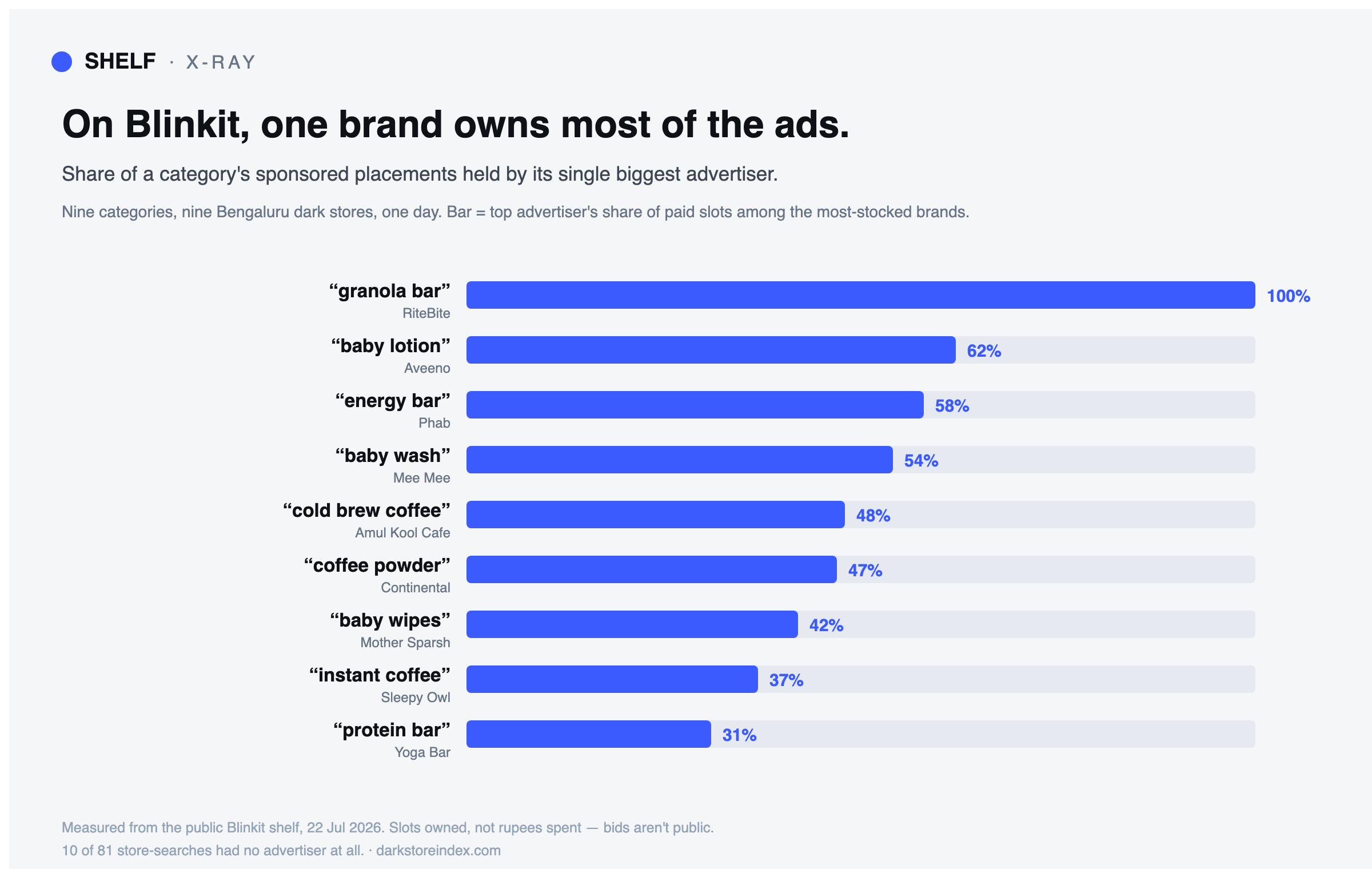
When a shopper opens Blinkit, results come from the dark store that will fulfil their order — built from what that store carries and how it's selling there. There is no national shelf. Your rank, your availability and whether a rival's ad sits above your name are resolved separately in every store.
So a single national average hides the thing you'd act on. You can be top-3 and deep in stock in one neighbourhood and absent two kilometres away, in the same minute — and an average of those two is a number that describes neither.
Four things that move the needle once you're listed
- Fill rate against purchase orders. Miss POs and you don't just lose those units — below a threshold it can cost you search position in that store's catchment too.
- Assortment, store by store. Being listed doesn't mean being carried everywhere. Which SKUs enter which stores is a category-manager conversation, backed by evidence of demand.
- Listing quality. Title, keywords and images are fully within your control, and they lift every store at once. It's the highest-leverage thing on this list because nobody has to approve it.
- Ad placement and brand-term defence. Rivals can and do advertise against your brand name. Ad slots resolve per store, so conquest can be happening in some neighbourhoods and not others. See brand-term conquest.
Note what's not on that list: moving stock between dark stores. You can't. Allocation is Blinkit's. Any advice that tells you to “restock store 14” misunderstands how the system works.
See your own shelf, store by store
Type your brand name and read your live Blinkit, Zepto and Swiggy Instamart shelf in each dark store — rank, stock, and who's advertising on your name. It's free, needs no signup, and connects to nothing: it reads the same public shelf a shopper sees.
Common questions
Can I sell on Blinkit without GST? No. GST registration is foundational, and the APOB step depends on it.
Is registration free? There's no headline fee to apply, but the real costs are commission, advertising and the working capital tied up in supplying inventory. Budget for those, not for a signup charge.
How is this different from Amazon or Flipkart? On a marketplace you hold stock and ship each order. On Blinkit your stock sits in the platform's local warehouses and it decides which store carries what — which is why performance is a per-store distribution, not a single number.
Do I need a brand authorisation letter? Only if you're not the brand owner. Distributors and authorised resellers do; it must be on the brand's letterhead and specify categories and territory.
Why do my sales differ so much between areas? Different dark stores, different assortments, different local ranking signals. That's the normal state, not a bug — the useful question is which stores, and the answer is readable from the public shelf.
Onboarding requirements, timelines and commission bands on this page are drawn from publicly published guidance by onboarding specialists and are consistent across independent sources as of July 2026. They are indicative. Blinkit sets and confirms actual terms per seller and category, and they change — verify with Blinkit before making commitments.
Keep reading
- Swiggy Instamart seller guide — the third platform, and the most crowded shelf.
- Zepto seller guideInstamart seller guide — the same ground for the other major platform.
- How to sell on Blinkit and Zepto — the step-by-step registration walkthrough.
- Blinkit dark stores explained — why each store is a separate shelf.
- Why your rank differs in every dark store — the ranking mechanic.
- Blinkit margin calculator — what you keep per unit, and your break-even ad spend.
- Blinkit advertising — who already owns the sponsored slots in your category.
- Organic vs paid visibility — what you earn versus what you rent.
- Glossary — dark store, fill-rate demotion, share of voice and the rest.