Zepto seller: registration, the Seller Hub — and what actually sells.
Registration is a document exercise with a known checklist. What happens afterwards is a shelf problem, resolved separately in every dark store — and that part is missing from almost every guide on this keyword.
The Zepto Seller Hub is on Zepto's own official seller site — go there directly to sign in. This page isn't a login portal, and you should never enter seller credentials on a third-party site, including this one. If you're after a job or delivery-partner role, Zepto's careers pages are the right place.
Who Zepto onboards
Manufacturers, distributors, retailers and D2C brands in groceries, FMCG and daily essentials — operating as a registered business with valid GST.
One structural difference from a general marketplace is worth knowing before you start: Zepto is commonly described as reviewing applications and contacting businesses that meet its requirements, rather than letting anyone list themselves instantly. It's closer to a supplier relationship than a self-serve signup, which means category fit and demonstrable demand matter at the door.
What registration takes
These are the requirements onboarding specialists consistently publish. They agree across independent sources, but terms change and are negotiated per brand — confirm specifics with Zepto directly rather than treating anything here as a quote.
- GST certificate and PAN for the registered business.
- Proof of business registration.
- Bank account details for settlement.
- FSSAI licence for any food product.
- Category-specific documents, requested during onboarding depending on what you sell.
- A signed seller agreement to formalise the relationship.
Commission is category-dependent, with 8–15% the range most commonly cited, and there may be delivery and packaging charges that vary by location and product type. Zepto gives you applicable rates during onboarding. For the parallel process on the other platform, see the Blinkit seller guide, and for both side by side, how to sell on Blinkit and Zepto.
What the Zepto Seller Hub gives you
After approval you get the Zepto Seller Hub. It's commonly described as covering catalogue upload, pricing and stock levels, real-time order tracking, returns and reviews, and sales performance reporting.
That data is yours and it's authoritative. Nothing on this page replaces it, and you should trust your own Hub numbers over any outside estimate of your orders, your fill rate or your payouts.
What it gives you is a rolled-up view of your own account. That's exactly right for supply planning and reconciliation — and it's the wrong instrument for the question that usually comes next.
The question the Hub structurally can't answer
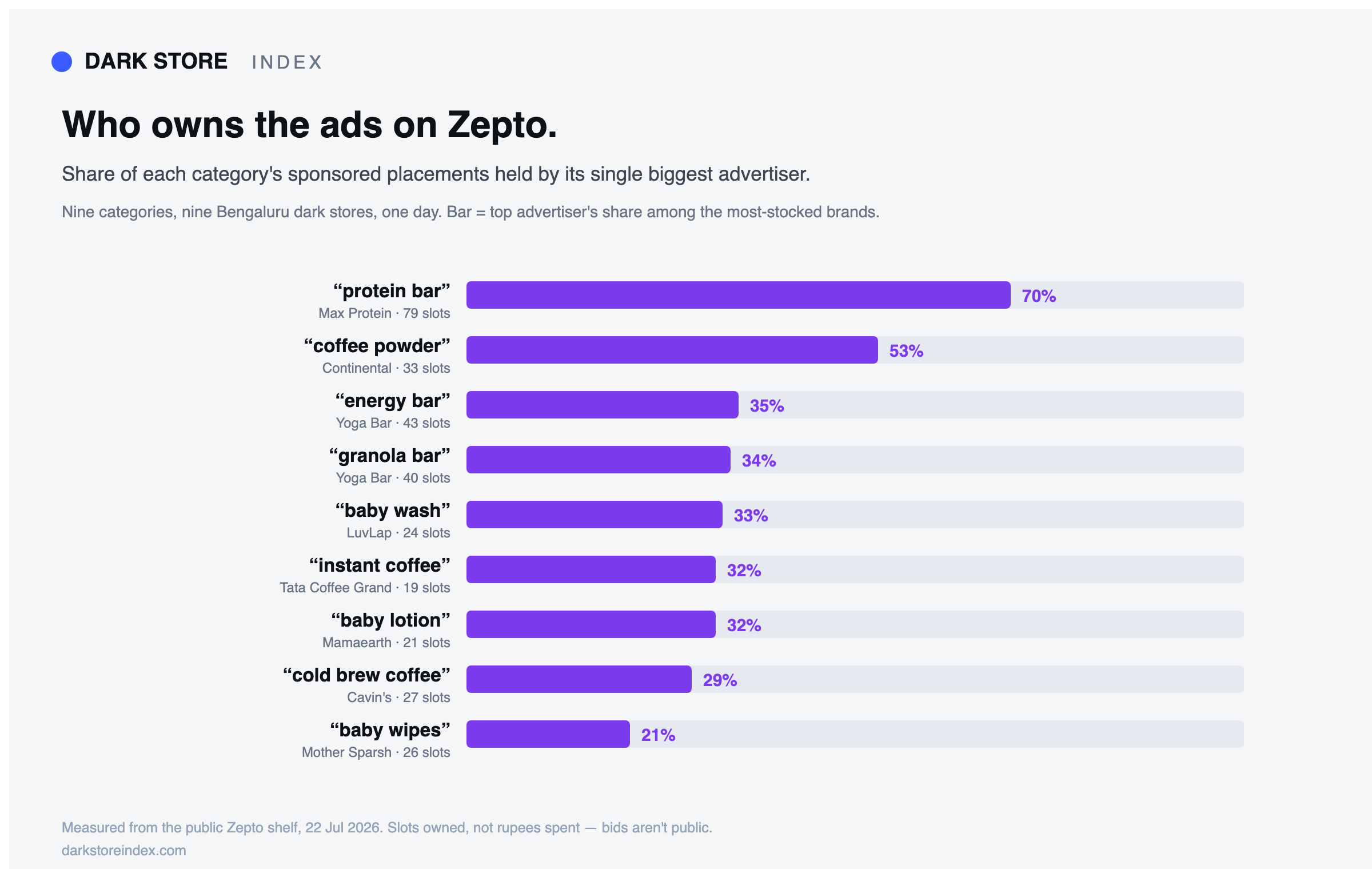
When a shopper opens Zepto, results are served from the dark store that will fulfil their order. So your search position, your availability, and whether a competitor's ad sits above your own brand name are all resolved store by store, not nationally.
Your Hub can't show you that, and it isn't a gap in the product — it's a category difference. Competitor rank and rival ad ownership are shopper-facing shelf data, not seller-account data. No seller portal on any platform contains them, because they're not yours to hold.
The practical consequence: a single national availability figure averages together neighbourhoods where you're top-3 and in stock with ones where you're absent, and describes neither.
Coverage depth varies by city — and it's measurable
One thing worth planning around on Zepto specifically: catalogue depth is not uniform across metros. Reading the same category across cities can return a healthy set of results in one metro and a noticeably thinner one in another, in the same session. Networks mature city by city, and assortment follows.
For a brand this cuts both ways. A thin category in a city is a weaker shelf to be listed on — and also a less contested one to argue your way into. Either way it's an assortment conversation with a category manager, and it goes better with the shelf read in hand than with an opinion.
Four things that move the needle once you're listed
- Fill rate against purchase orders. Missing supply doesn't just cost those units; below a threshold it can cost search position in that store's catchment too.
- Assortment, store by store. Listed is not the same as carried. Which SKUs enter which stores is a category-manager decision, and evidence of local demand is what moves it.
- Listing quality. Titles, keywords and images are entirely yours, need nobody's approval, and lift every store at once. Highest leverage on this list.
- Ad placement and brand-term defence. Rivals can advertise against your brand name, and ad slots resolve per store — so it can be happening in some neighbourhoods and not others. See brand-term conquest.
What's deliberately not on that list: moving stock between dark stores. You can't — allocation sits with the platform. Advice that tells you to “restock store 12” is describing a lever that doesn't exist.
See your own Zepto shelf, store by store
Type your brand name and read your live Zepto, Blinkit and Swiggy Instamart shelf in each dark store — rank, stock, and who's advertising on your name. Free, no signup, and it connects to nothing: it reads the same public shelf a shopper sees, so it works whether or not you're already selling.
Common questions
Can I register on Zepto without GST? No. GST registration is foundational to the whole process.
How long does approval take? It depends on category fit and how complete your documents are. Because Zepto reviews and reaches out rather than auto-approving, timelines vary more than on a self-serve marketplace — treat any single published figure with caution.
Is there a registration fee? The meaningful costs are commission, any delivery and packaging charges, advertising, and the working capital tied up in supplying stock — not a signup charge.
Zepto or Blinkit first? Depends on where your category actually has a shelf worth winning. That's readable before you commit: check which platforms already carry your category in your cities, and how contested each one is.
Does the Seller Hub show competitor data? No, and no seller portal does. It's your account data. Competitor rank and rival ads live on the public shelf.
Registration requirements, commission bands and Seller Hub features described here are drawn from publicly published guidance by onboarding specialists and are consistent across independent sources as of July 2026. They are indicative and change. Zepto sets and confirms actual terms per seller and category — verify with Zepto before making commitments. Shelf observations are read from public, shopper-facing listings; no seller's private account data is used.
Keep reading
- Swiggy Instamart seller guide — the third platform, and the most crowded shelf.
- Blinkit seller guide — the same ground for the other major platform.
- How to sell on Blinkit and Zepto — the step-by-step registration walkthrough.
- Dark stores explained — why each store is a separate shelf.
- Why your rank differs in every dark store — the ranking mechanic.
- Glossary — dark store, fill-rate demotion, share of voice and the rest.